---
title: "Installing the server"
description: "Requirements: PHP 8.2+ and Composer."
canonical: installing.html
navigation-title: "Installing"
---
# Installing the server
- [Standalone](#standalone)
- [One entry for every project](#one-entry-for-every-project)
- [As a dependency](#as-a-dependency)
- [In a DDEV project](#in-a-ddev-project)
- [Naming the client](#naming-the-client)
- [The instruction block](#the-instruction-block)
- [The VS Code switch](#the-vs-code-switch)
- [Finishing in the client](#finishing-in-the-client)
- [Keeping it current](#keeping-it-current)
- [When they go stale](#when-they-go-stale)
- [Refreshing on update](#refreshing-on-update)
- [What the entry may carry](#what-the-entry-may-carry)
- [Which tools the client gets](#which-tools-the-client-gets)
- [What comes with it](#what-comes-with-it)
- [Removing it](#removing-it)
- [Which path the entry names](#which-path-the-entry-names)
Requirements: **PHP 8.2+** and Composer. A standalone checkout is the ordinary
way in: one clone serves every project on the machine and stays out of each
project's dependencies. A project can require the package instead, which is the
second section. The [readme](https://github.com/TYPO3/dev-companion/blob/main/readme.md) has the short version; this page
has the cases it leaves out.
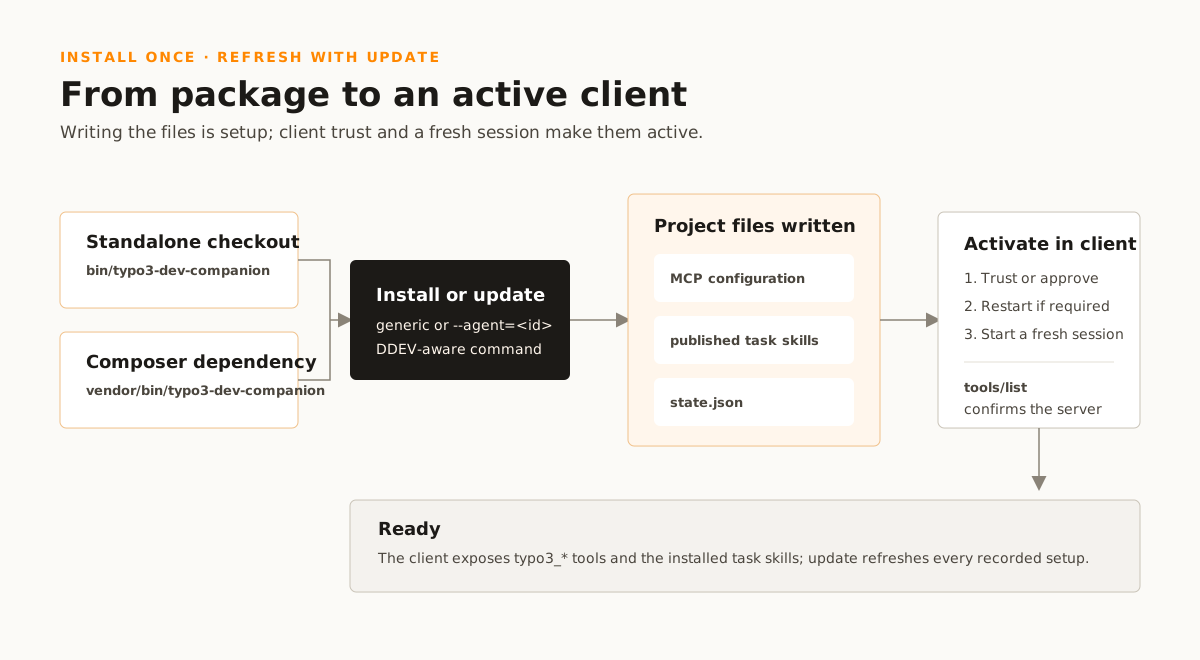
`install` and `update` write into the directory they run in, which is the
project under setup. Every command below is therefore run from the root of the
project the agent works in, and never from inside the server's own checkout.
## Standalone
Clone the repository and install its dependencies once:
```bash
git clone https://github.com/TYPO3/dev-companion.git typo3-dev-companion
cd typo3-dev-companion
composer install
```
The clone takes its name from the binary rather than from the repository. So the
absolute path in every command below is the directory `git clone` just made.
Then change into the project the agent works in and install the entrypoint into
its `.mcp.json`:
```bash
cd /path/to/your/project
/absolute/path/to/typo3-dev-companion/bin/typo3-dev-companion install
```
It writes the following shape with the actual absolute path:
```json
{
"mcpServers": {
"typo3-dev-companion": {
"type": "stdio",
"command": "php",
"args": ["/absolute/path/to/typo3-dev-companion/bin/typo3-dev-companion"]
}
}
}
```
This is the setup to use when working on the knowledge base itself, since the
`feedback/` tools only exist in a checkout.
### One entry for every project
Everything above is per project, and a machine with a dozen of them can carry
one entry instead. Nothing here writes it. The client documents its own command
and what `install` writes stays inside the project it pointed at, see
[D-DIS-018](https://github.com/TYPO3/dev-companion/blob/main/decisions/discovery/dis-018-what-install-writes-stays-inside-the-project.md).
Two steps on the machine, written down rather than scripted for the same reason.
Put the entrypoint where the shell finds it, so no entry has to spell the
checkout out:
```bash
ln -s /absolute/path/to/typo3-dev-companion/bin/typo3-dev-companion ~/.local/bin/
```
The symlink resolves to the checkout, so the autoloader turns up and `install`
still records the real path. Then register it once, for every project, with the
client's own command. That is Claude Code's user scope, which its documentation
describes as the place for the development tools somebody uses across projects:
```bash
claude mcp add --scope user typo3-dev-companion -- typo3-dev-companion
```
Two things follow, and both are the client's rule rather than this package's. A
project that has its own entry keeps it. The scopes rank local, project, user,
and the whole entry from the first of those wins rather than merges. And the
task skills do not come with it. An MCP entry registers a server, while a skill
is a file in a project, so `install` stays the way they get there.
What this does buy for the skills is the refresh under
[Keeping it current](#installing-keeping-it-current). The server now starts in every project. So
it puts a drifted publication back wherever one has drifted, instead of only
where somebody remembered to look.
## As a dependency
The package is on Packagist as `typo3/dev-companion`, so the project that uses
it requires it and nothing else:
```bash
composer require "typo3/dev-companion:@dev"
```
The constraint names a stability because no release has a tag. `dev-main` is
the only version there is, and the default minimum stability refuses a plain
require. The experimental note in the [readme](https://github.com/TYPO3/dev-companion/blob/main/readme.md) is why — pin a
commit where the project depends on it.
That is the way in where the entry has to be shareable. A DDEV project, or a
team where each checkout should carry the same one. The entry then names a path
inside the project. Composer exposes the stdio entrypoint as
`vendor/bin/typo3-dev-companion`. Install it from that project's root:
```bash
vendor/bin/typo3-dev-companion install
```
`vendor/bin/typo3-dev-companion help` lists both commands and every client
they accept. Anything else fails with that same text. Without an argument the
entrypoint is the MCP transport itself and waits on stdin, which at a terminal
looks exactly like a hang.
The entry names the entrypoint inside the project where the client can resolve
that, and this server's absolute path everywhere else:
```json
{
"mcpServers": {
"typo3-dev-companion": {
"type": "stdio",
"command": "php",
"args": ["/absolute/path/to/project/vendor/bin/typo3-dev-companion"]
}
}
}
```
Which clients resolve a path inside the project, and why the others get an
absolute one, is [Which path the entry names](#installing-which-path-is-written). The knowledge base
ships inside the package, so nothing else needs a deployment or a configuration.
To work against a checkout instead, clone it and name it as a path repository.
That changes the server and the project that uses it in one go. Composer
symlinks that into `vendor/` so an edit is live in the project:
```bash
git clone https://github.com/TYPO3/dev-companion.git typo3-dev-companion
```
```json
{
"repositories": [
{ "type": "path", "url": "/absolute/path/to/typo3-dev-companion" }
]
}
```
The require is the same one and resolves against the checkout instead.
### In a DDEV project
Run the installer inside DDEV:
```bash
ddev exec vendor/bin/typo3-dev-companion install
```
The project directory is a mount, so the host sees the skills at
`.agents/skills`. The generated MCP entry starts the server with the project's
container PHP, at the entrypoint inside the project. That is below
`vendor/bin`, or below the `bin-dir` the project's `composer.json`
declares instead, which is `.build/bin` in the layout most extension
repositories use:
```json
{
"mcpServers": {
"typo3-dev-companion": {
"type": "stdio",
"command": "ddev",
"args": ["exec", "php", ".build/bin/typo3-dev-companion"]
}
}
}
```
This server's own checkout is a DDEV project too where it carries a
`.ddev/config.yaml`, and `install` run in it names
`bin/typo3-dev-companion` the same way. A DDEV project that neither required
the package nor is its checkout gets the absolute path of the checkout instead.
The container cannot see a checkout outside the project.
## Naming the client
No client name at all is a setup of its own, recorded as `generic`.
`install` then writes the `.mcp.json` entry and publishes the skills to
`.agents/skills`, the two locations a client finds without configuration for
it. `--agent=` names a client that reads elsewhere. Each one receives the
skills at its native project path and, where it supports one, its native MCP
configuration. `--agent=` does not take `generic`, because it is nobody's
name.
| Client | `--agent=` | MCP entry | Skills | Instruction block |
| --- | --- | --- | --- | --- |
| none named | — | `.mcp.json` | `.agents/skills` | `AGENTS.md` |
| Claude Code | `claude` | `.mcp.json` | `.claude/skills` | `CLAUDE.md` where one is, else `AGENTS.md` |
| Codex | `codex` | `.codex/config.toml` | `.agents/skills` | `AGENTS.md` |
| VS Code | `copilot` | `.vscode/mcp.json` | `.github/skills` | `AGENTS.md` |
| Cursor | `cursor` | `.cursor/mcp.json` | `.cursor/skills` | `AGENTS.md` |
| Amp | `amp` | `.amp/settings.json` | `.agents/skills` | `AGENTS.md` |
| Zed | `zed` | `.zed/settings.json` | `.agents/skills` | `AGENTS.md` |
| Kiro | `kiro` | `.kiro/settings/mcp.json` | `.kiro/skills` | `AGENTS.md` |
| Droid | `factory` | `.factory/mcp.json` | `.factory/skills` | `AGENTS.md` |
| Junie | `junie` | `.junie/mcp/mcp.json` | `.junie/skills` | `.junie/AGENTS.md` where one is, else `AGENTS.md` |
| opencode | `opencode` | `opencode.json` | `.agents/skills` | `AGENTS.md` |
| Grok | `grok` | `.grok/config.toml` | `.grok/skills` | `AGENTS.md` |
| Antigravity | `antigravity` | none | `.agents/skills` | `.agents/rules/typo3-dev-companion.md` |
| Pi | `pi` | none | `.pi/skills` | `AGENTS.md` |
Antigravity and Pi receive skills only, so for them there is no entry and
nothing to finish. `typo3-dev-companion help` prints the same identifiers.
### The instruction block
`install` and `update` also write a block into the file the client reads
before a session's first turn, which the last column names. It stands between
`` and
``. It says that the server and its
`typo3-*` skills are here, that a task starts with `typo3_project_describe`
and the skill that covers it, and which questions go to the server whatever
route another instruction in the same file prescribes. Four sessions in one
checkout had the skills listed and the tools named and activated nothing,
because the checkout's own `AGENTS.md` carried a `curl` route for the
question a tool here answers,
[D-SKL-033](https://github.com/TYPO3/dev-companion/blob/main/decisions/task-skills/skl-033-whether-a-skill-is-activated-is-the-clients-and-the-models.md).
The two commands own what stands between the marks and nothing outside them. A
file without the marks gets the block at its end, and a project without the file
gets the file. Which file is the client's own documentation, read on 2026-09-19:
`AGENTS.md` is the one the clients share, Claude Code reads it only where no
`CLAUDE.md` is in the project or above it, Junie reads `.junie/AGENTS.md`
before it, and Antigravity reads `.agents/rules/` and no file at the root. To
take the block out, delete from the start mark to the end mark; the next
`update` writes it again, so take the client out of the record first or run no
`update`.
### The VS Code switch
`--agent=copilot` writes the skills to `.github/skills`, which is one of the
two locations VS Code searches by default. That holds only if
`chat.useAgentSkills` is on, and it is not:
```json
"chat.useAgentSkills": true
```
Without it the client assembles no search paths at all, so nothing reports that
the skills sit in the repository unread. A session there answers from the
checkout as if none existed (measured on VS Code 1.131.0, 2026-07-31).
`chat.agentSkillsLocations` is the list itself and needs no change: it already
covers `.github/skills` and `.claude/skills` per workspace.
`github.copilot.chat.skillTool.enabled` is a different, experimental switch
and not the one that makes them visible.
## Finishing in the client
The entry on disk registers the server with nothing. A client that scopes
project servers behind an approval has not seen the question yet. A session that
was already open when the file landed runs against the configuration it started
with. Both end with an entry that is entirely correct, a published skill that
names the tools beside it, and no tool in the session. That is where two
sessions in one project went, on 2026-07-29 and 2026-07-31.
`install` and `update` print what follows under the line that reports the
entry, so you read it at the terminal rather than here. What each client needs
is the client's own property, so each line below is that client's own
documentation, read on 2026-08-02. A client whose documentation does not answer
stays open rather than gets a fill:
- **Claude Code** — a restart and an approval. "Claude Code reads `.mcp.json`
at session start. Exit and restart the session after editing the file", and
"the first time Claude Code sees a project-scoped server, it asks you to
approve it". Approve at the prompt or in `/mcp`; a server once refused is
reset with `claude mcp reset-project-choices`.
([quickstart](https://code.claude.com/docs/en/mcp-quickstart),
[reference](https://code.claude.com/docs/en/mcp))
- **Amp** — an approval. "MCP servers in workspace settings
(`.amp/settings.json`) require explicit approval before they can run." And
"in the CLI, you'll be prompted to approve workspace servers when they're
first detected". `amp mcp approve typo3-dev-companion` does it without the
prompt, and `amp mcp doctor` shows one `awaiting approval`.
([manual](https://ampcode.com/manual))
- **VS Code** — a trust confirmation. "When you add an MCP server to your
workspace or change its configuration, you need to confirm that you trust the
server and its capabilities before starting it." The experimental
`chat.mcp.autoStart` restarts the server when the configuration changes.
([MCP servers](https://code.visualstudio.com/docs/copilot/customization/mcp-servers))
- **Codex** — a trusted project. Codex scopes MCP servers "to a project with
`.codex/config.toml` (trusted projects only)", so the trust prompt for the
directory is what admits them. Whether a live session reads the file again has
no documentation; `codex mcp list` reports what it has.
([MCP](https://learn.chatgpt.com/docs/extend/mcp))
- **Zed** — a trusted worktree. The MCP page describes `context_servers` only
in the file opened with `zed: open settings file`. But the rest of the
documentation puts it in the project file, "every worktree opened may contain
a `.zed/settings.json` file with extra configuration options that may
require installing and spawning language servers or MCP servers". Zed's own
advisory for the vulnerability the trust model answers agrees. It says "the
Zed IDE loads Model Context Protocol (MCP) configurations from the
`settings.json` file located within a project's `.zed` subdirectory". So
the client reads the written entry, behind a gate the other clients do not
have. Every worktree starts in Restricted Mode. That prevents "project
settings (`.zed/settings.json`) from being parsed and applied" and "MCP
servers from being installed and spawned". The title bar carries an
exclamation mark until the user trusts the directory there or with
`workspace::ToggleWorktreeSecurity`. Whether a window that was already open
reads a new file has no documentation. Read 2026-08-02, when the current
release was v1.13.1; the trust model arrived in v0.218.2-pre.
([MCP](https://zed.dev/docs/ai/mcp),
[trusted worktrees](https://zed.dev/docs/worktree-trust),
[GHSA-cv6g-cmxc-vw8j](https://github.com/zed-industries/zed/security/advisories/GHSA-cv6g-cmxc-vw8j))
- **Kiro** — nothing. "Changes to MCP configuration apply automatically when you
save the file" and "servers will reconnect". A tool `autoApprove` does not
name is still asked about on the call.
([MCP configuration](https://kiro.dev/docs/mcp/configuration/))
- **Droid** — nothing. "Droid reloads automatically when an `mcp.json` file
changes, so new servers are available immediately." Each tool gets its
approval on first use, and `droid mcp permissions` keeps that approval.
([MCP](https://docs.factory.ai/cli/configuration/mcp))
- **Junie** — no approval: servers "imported from the `mcp.json` file are
enabled by default". Whether an IDE that was already open reads a new one is
not documented; the list is *Settings | Tools | Junie | MCP Settings*.
([MCP configuration](https://junie.jetbrains.com/docs/junie-cli-mcp-configuration.html))
- **Cursor** — unestablished. Servers stand under *Customize*, where a toggle
switches one off, and "Cursor asks for approval before using MCP tools by
default". That is the tool call, not the server. Whether a window that was
already open reads a new file is not documented.
([MCP](https://cursor.com/docs/mcp))
- **opencode** — unestablished. `enabled: false` switches a server off, which
the written entry does not. Whether a session that was already open reads the
file again has no documentation.
([MCP servers](https://opencode.ai/docs/mcp-servers/))
- **Grok** — unestablished. A project `.grok/config.toml` does contribute
`[mcp_servers]`, up to the git root. Whether a session that runs reads it
again, and whether anything gates it, has no documentation.
`grok mcp doctor` reports what it has.
([MCP servers](https://docs.x.ai/build/features/mcp-servers))
Where a session has the entry and still offers no `typo3_` tool,
[Checking that it answers](checking-it-answers.md) is the rest of the ladder.
## Keeping it current
A published skill is a copy, so it goes stale the moment this package moves.
`update` is what refreshes it, along with the client entry:
```bash
vendor/bin/typo3-dev-companion update
```
`update` takes `--agent=` as well, but rarely needs to. `install`
records every client it set up in `.typo3-dev-companion/state.json`, and
without an agent `update` refreshes all of them. A project is usually worked
on by more than one, and which ones is knowledge only the project has.
Both commands write the client entry, because what belongs in it is a property
of the project rather than of the run. A project that required this package
after its first install needs a different entry than the one that is there. So
does one that gained a DDEV configuration since. `update` is what moves it. An
entry that starts something other than this server is somebody else's and gets a
refusal instead. The two commands then say so and change nothing.
They own the command in that entry and nothing else. Whatever the caller put
beside it stays — `env` above all, which is where the entry carries the
[variables below](#installing-what-the-entry-may-carry). In a
`.codex/config.toml` or a `.grok/config.toml` that means every line of the
section this package does not write. So a value that continues on the next line
gets a refusal with the line number rather than a rewrite around it. A kept line
means a known end of it.
### When they go stale
The record carries a digest of the publication, and a server started in that
project compares it before the first call, see
[R-DIS-025](https://github.com/TYPO3/dev-companion/blob/main/requirements/discovery/dis-025-a-publication-that-went-stale-says-so-before-the-first-call.md).
Where they no longer match, the server republishes what the record names, for
the clients it names, and writes no client configuration. Then it says so twice.
The long line goes to stderr and names what differed and what went out again.
One short sentence goes into the instructions a client gets at initialize. A
skill the client loaded when the session opened is the copy that was there
before.
A project with no record stays as it is, and a refresh that fails leaves the
notice as it was and the server starts anyway. Why the server does it rather
than a command somebody runs is
[D-DIS-021](https://github.com/TYPO3/dev-companion/blob/main/decisions/discovery/dis-021-a-stale-publication-is-put-back-where-the-server-starts.md).
On the machine that prompted it, twelve projects had heard the notice at every
session start for weeks.
Set `TYPO3_DEV_COMPANION_SKILL_REFRESH=off` to keep the notice and nothing
else. That is for a reader who wants the copies in their project to move when
they say so. A review of what a release changed, or a project where the skills
are part of a diff.
### Refreshing on update
A project can have the thing that moved the package run the refresh. Composer
fires `post-update-cmd` after `composer update`, and the project's own
`composer.json` is where that lives:
```json
{
"scripts": {
"post-update-cmd": [
"typo3-dev-companion update"
]
}
}
```
Nothing here writes that line. `install` and `update` write client
configuration, the skills and the record, and a file that decides what the
project consists of is not among them.
The command needs no path. Composer pushes the project's declared `bin-dir`
onto `PATH` before it runs a script. So the bare name resolves whether the
project puts its binaries in `vendor/bin` or in `.build/bin`. It runs in the
project root, which is where the record is.
A project with no install hears so and the run succeeds. That is the ordinary
case for everybody but the person who set it up. The record sits below a
directory that ignores itself, so it is in no checkout but theirs. A script that
exits non-zero fails the whole Composer run.
What the hook does not cover is the fresh clone. `post-update-cmd` fires on
`composer update` and on an `install` with no lock file, so a colleague who
installs from the lock runs nothing. There the notice at the next server start
is what says the copies are behind.
## What the entry may carry
Four environment variables, all set in the `env` block of the client entry,
which is the one part of it `install` and `update` leave alone:
- `TYPO3_DEV_COMPANION_ROOT` — the installation to read, where the one found
from the working directory is the wrong one — [Checking that it answers](checking-it-answers.md).
- `TYPO3_DEV_COMPANION_CONSOLE` — the command that runs that installation's
console, such as `ddev exec .build/bin/typo3` — [Checking that it answers](checking-it-answers.md).
- `TYPO3_DEV_COMPANION_EXCLUDE_TOOLS` — tool names, comma-separated, the
client does not get, see
[which tools the client gets](#installing-which-tools-are-offered).
- `TYPO3_DEV_COMPANION_SKILL_REFRESH` — `off` reports stale skills instead
of a repair — [when they go stale](#installing-when-they-go-stale).
### Which tools the client gets
Every one of them, wherever the server started. Some of what it knows is the
core's own contribution process, the review rules, the Gerrit workflow, the core
testing suites. None of that transfers to a project. The answer says what it is
worth, per topic and per path. Whether a task is core work is a property of the
task and not of the directory the ask comes from.
The server used to leave those three tools out of a Composer project. That read
the repository where the task was meant. A core patch written from a site
installation got a core work answer and then a route to a tool the client did
not have.
- `TYPO3_DEV_COMPANION_EXCLUDE_TOOLS` removes tools by their comma-separated
names, and is the only thing that shortens the list. Three names never shorten
it. `typo3_server_scope`, because it is what explains a shorter list.
`typo3_feedback_record` and `typo3_feedback_list`, because the feedback
channel is a development tool for the build of this server rather than part of
its use. See
[R-SCO-009](https://github.com/TYPO3/dev-companion/blob/main/requirements/scope/sco-009-individual-tools-can-be-excluded.md).
- The server reports a name in it that takes no tool away rather than absorbs
it. It does so on stderr before the transport starts and again under
`excludedTools.ignored` in `typo3_server_scope`. That covers both reasons
a name takes nothing away. No tool of this server answers to it, a rename, or
a typo, or it is one of the three above.
`typo3_server_scope` names what was really excluded, and nothing routes to a
tool that is not there. What the server says is gone is what is gone. It never
reports a name that changed nothing as an absent capability. A client cannot
check the claim and pays for it out of the instructions it gets.
### What comes with it
Clients that expose MCP prompts also list `commit_message`. It turns a summary
into the same checked draft as `typo3_commit_message_guide`. The rules stay in
the guide rather than in a second copy in the prompt.
`debrief` stands beside it in a standalone checkout of this repository, where
the feedback channel exists. It takes no arguments and asks the session that has
just finished what this server did for it and what it lacked. The same gate
holds the two feedback tools, so a project that installed the server as a
dependency lists none of the three. How a client runs one, and what Claude Code
makes of a summary with a space in it: [The MCP prompts](working-with-it.md#working-with-it-the-prompts).
Task skills have one source, below `skills/`. They contain routing and order,
not a second copy of tool answers; client installation publishes them from that
source.
## Removing it
Four things landed in the project, and no command takes them out again, so to
remove the server is to delete them by hand:
- the `typo3-dev-companion` entry in the client file the table under
[naming the client](#installing-clients) names, and only that entry. The
file may carry other servers;
- one directory per published skill in the skills directory the table names;
- the block between the two marks in the instruction file the table names,
[The instruction block](#installing-the-instruction-block);
- `.typo3-dev-companion/`, where the record sits.
Neither command touches the project's `.gitignore`. Every directory this
package writes, each published skill, and `.typo3-dev-companion/`, carries a
`.gitignore` of its own that says `*`. That covers the directory and that
file with it. Git reports nothing there, and a skill the project wrote itself,
in the same skills directory, stays visible. No ignore rule covers merged agent
or MCP configuration such as `.codex/config.toml` or `.mcp.json`, because
the project may share it.
Development builds before this wrote a `typo3-dev-companion.json` at the
project root. They wrote a block between `# BEGIN typo3-dev-companion` and
`# END typo3-dev-companion` into the project's `.gitignore`. Nothing here
reads or removes either. A project that has them got its setup by hand and takes
them out the same way, and the next `install` records the clients again.
## Which path the entry names
Three shapes, and which one a client gets is a property of that client. Where
the project has this server as a Composer dependency, or is its checkout, the
entry names the path inside the project. That goes through `ddev exec` where
there is a DDEV configuration, and through `${workspaceFolder}` in VS Code and
Cursor. Everywhere else it is this server's absolute path on the machine the
install ran on. That is a value one machine is right about, in a file its own
client documents as the shared, committed one. There the install says so; the
read below is why there is nothing better to write.
A relative path would have to resolve against the working directory the client
launches the process in. The MCP specification does not define one: the stdio
transport is "the client launches the MCP server as a subprocess" and nothing
about a directory. So it is each client's property, read on 2026-08-09 from the
same pages as [Finishing in the client](#installing-finishing-in-the-client).
| Client | Working directory | Project root in `command`/`args` |
| --- | --- | --- |
| VS Code | `cwd`, "defaults to the workspace folder" | `${workspaceFolder}` |
| opencode | `cwd`, relative paths "resolve from the workspace" | none documented |
| Codex | `cwd`, "working directory to start the server from" | not documented |
| Cursor | not documented | `${workspaceFolder}`, in both fields |
| Claude Code | not documented, and advised against | needs `${CLAUDE_PROJECT_DIR:-.}` |
| Grok | not documented | `${VAR}` expands, no root variable |
| Amp | not documented | `${VAR}` for environment values only |
| Kiro | not documented | `${VAR}` shown for `env` only |
| Junie | not documented | not documented |
| Zed | not documented | not documented |
| Droid | not documented | expansion "does not apply to `command`, `args`, or `url`" |
One client documents the workspace as the default, and three offer a `cwd` to
set. Two resolve a variable that names the project root, and one refuses
expansion in those fields outright. Claude Code is the sharpest of them. It sets
`CLAUDE_PROJECT_DIR` in the spawned server's environment "so your server can
resolve project-relative paths **without depending on the working directory**".
The same variable in a project-scoped `.mcp.json` "requires a default such as
`${CLAUDE_PROJECT_DIR:-.}`", which is the work directory again.
The variable is what the two who have one get, rather than the plain relative
path VS Code's default working directory would also carry. It says the same
thing without a rest on where the process started. That is the property the
client most sessions use asks for by name:
```json
{
"servers": {
"typo3-dev-companion": {
"type": "stdio",
"command": "php",
"args": ["${workspaceFolder}/vendor/bin/typo3-dev-companion"]
}
}
}
```
For the other nine a relative entry would be wrong on the machine that wrote it
too. An absolute one is at least right there. So the install says it, per client
and at the terminal, beside the line that reports the entry —
[D-DIS-016](https://github.com/TYPO3/dev-companion/blob/main/decisions/discovery/dis-016-how-an-entrypoint-may-be-named-is-a-per-client-question.md).
None of this reaches a standalone checkout. `${workspaceFolder}` names a path
inside the project, and a server that runs from somewhere else has none. There
the absolute path is the only one that exists, whatever the client resolves.
The sources are the same as
[finishing in the client](#installing-finishing-in-the-client), plus three
more.
[The MCP transports specification](https://modelcontextprotocol.io/specification/2025-06-18/basic/transports),
[VS Code's configuration reference](https://code.visualstudio.com/docs/agents/reference/mcp-configuration)
and [Cursor's MCP page](https://cursor.com/docs/context/mcp).